Pulse Inbox Guide to Shared Inbox and Human Takeover
How to run your team from Pulse Inbox. Learn when to switch AI replies off, how Smart handoff works, how to hand chats back to your Closer, and daily inbox routines.
AI should handle the repetitive work. Humans should handle the moments that matter. Pulse Inbox is where those two meet.
Every conversation your Closers have lands in Pulse Inbox. You can read along, step in with one toggle, and hand the chat back when you're done. This guide shows you how to use it well, alone or with a team.
The layout
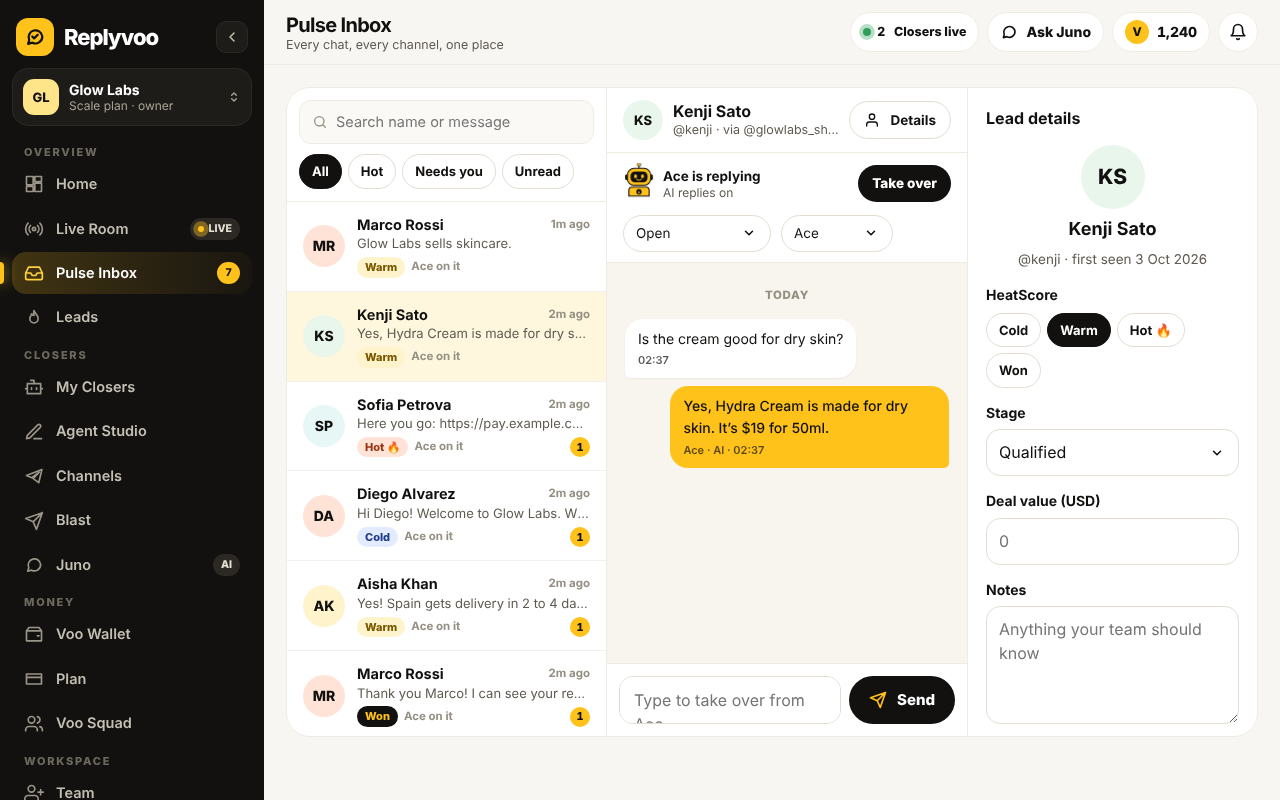
Pulse Inbox has three areas:
- Conversation list on the left. Every chat across your connected Telegram bots, groups and personal account, with the newest activity on top. You'll see HeatScore labels (Hot, Warm, Cold) and flags for chats that need a human.
- Chat view in the middle. The full thread, including what the customer said, what the Closer replied, any images or voice notes, and payment links sent.
- Customer details on the side. Lead stage, HeatScore, notes and history.
At the top of each chat is the most important control in the product: the AI replies toggle.
The AI replies toggle
Every chat has its own toggle.
- On: your Closer replies automatically.
- Off: the Closer stays silent in this chat, and you reply yourself.
Turning it off for one chat doesn't affect any other. Your Closer keeps working everywhere else.
Takeover should feel like tapping a colleague on the shoulder, not pulling the plug.
When to take over
You don't need to watch every chat. Step in when:
- The chat is flagged for handoff. Smart handoff detected something the Closer shouldn't handle alone.
- A Hot lead is close to buying a big order. A personal touch can close it.
- A customer is upset. Even if the Closer is polite, some people want a human.
- The question is unusual. Custom orders, partnerships, wholesale, press.
- You spot a wrong answer. Correct it in the chat, then fix the knowledge base so it doesn't happen again.
How Smart handoff works
Smart handoff is a skill you enable in Agent Studio. When it's on, your Closer passes a chat to a human when:
- It isn't confident it has the right answer
- The customer asks for a person
- The conversation matches a handoff rule you wrote in the knowledge base (refunds over a limit, medical questions, bulk orders, and so on)
When that happens, the Closer tells the customer someone will follow up, and the chat is flagged in Pulse Inbox. You'll want to reply fast. Customers forgive "let me get a colleague" but not silence afterwards.
If you haven't written handoff rules yet, Write a knowledge base your Closer can actually use has a ready list.
Step by step: taking over a chat
- Open Pulse Inbox.
- Click the chat you want.
- Read the thread so you know what's been said.
- Switch AI replies off.
- Type your reply and send. It goes to the customer on Telegram from the same bot or account.
- Handle the issue fully.
- Decide whether to hand back (next section).
Tip: introduce yourself when you step in. "Hi, this is Sam from the team, I'll take it from here." It sets expectations and builds trust.
Handing back to the Closer
Once the special issue is resolved, switch AI replies back on. The Closer picks up with the context of the conversation and handles routine follow-ups like delivery questions.
Leave AI off when:
- The customer is a VIP who prefers dealing with you
- A dispute is ongoing
- You're negotiating a custom deal
For VIP relationships, consider a dedicated Royal (VIP Concierge) Closer instead, which is tuned to hand off early and often.
Working as a team
If several people answer chats:
- Give everyone their own login. Don't share one account.
- Agree on ownership. Whoever switches AI off owns the chat until they hand it back.
- Use notes. Leave a short note on the customer so the next person knows the story.
- Set response targets. For example: flagged chats answered within 15 minutes during business hours.
- Split by Closer or channel. One person watches the sales bot, another watches support.
Watching live: the Live Room
Pulse Inbox is for handling chats. Live Room is for watching your Closers work in real time across all channels. It's useful in the first few days after launch, during a Blast, or when you're running a big ad campaign and want to see how the Closer handles the rush.
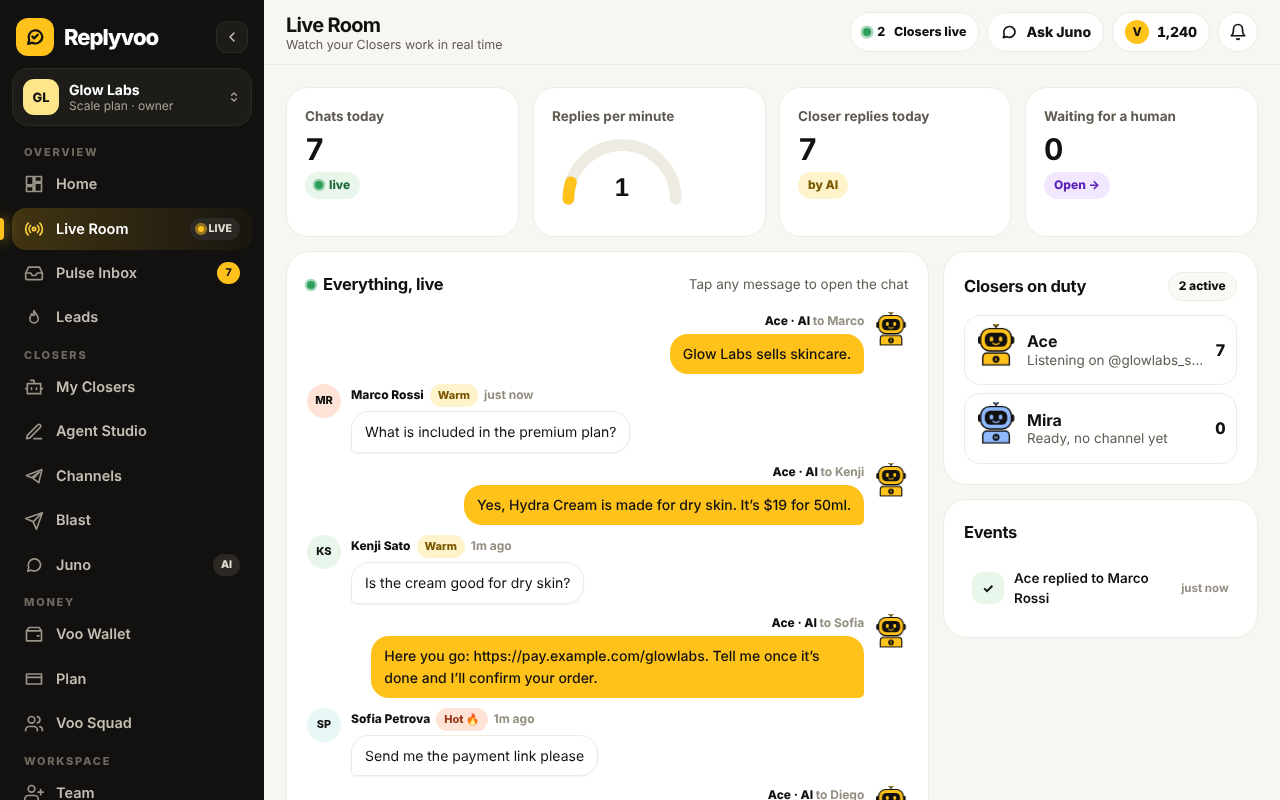
If you see something worth stepping into, jump from Live Room straight to the chat in Pulse Inbox.
A daily inbox routine
Morning (10 minutes)
- Read the Night Shift Report for overnight activity and flagged chats
- Clear all handoff flags first
- Message Hot leads who didn't buy yet
Midday (5 minutes)
- Scan flagged chats
- Check any chat with a payment pending or receipt to confirm
End of day (10 minutes)
- Review a handful of AI chats at random for quality
- Fix any knowledge gaps you spotted
- Ask Juno "Which chats today needed a human and why?"
That's under 30 minutes a day to supervise what used to be hours of typing.
Using HeatScore inside the inbox
Each chat carries a HeatScore and a stage: New → Qualified → Checkout → Won. Filter the inbox by Hot leads or by Checkout stage to find people closest to buying. That's where human attention pays most. Learn more in HeatScore and Nudge follow-ups.
Common mistakes
- Forgetting to turn AI back on. The customer comes back next week and no one answers. Make hand-back part of closing any chat.
- Taking over everything. If you're switching off AI in most chats, the problem is your knowledge base or personality settings. Fix those instead.
- Answering on your phone and in Pulse Inbox at once. On personal Telegram, decide where you'll work so you don't double-reply.
- Ignoring handoff flags. A flag is a promise to the customer that a person is coming.
Next steps
- Start free on Replyvoo and open your Pulse Inbox
- Turn leads into sales with HeatScore and Nudge
- Why speed to lead decides who wins the sale
Your first Closer is free and live in minutes.