AI Closer on Your Personal Telegram via Telegram Business
Let an AI Closer reply to customers from your own Telegram account using Telegram Business chatbots. Setup steps, privacy controls and best practices.
Many sellers don't run a bot. Customers just message them, on their personal Telegram, because that's the number on the flyer, the handle in the bio, the contact a friend passed along. Those chats pile up between your family group and your cousin's memes, and replies slip.
Telegram Business lets you connect a chatbot to your own account so it can reply on your behalf. Replyvoo uses this to put an AI Closer on your personal Telegram. Customers keep messaging the same account they always have. They just get answers faster.
What you need
- Telegram Premium on the account you want to automate. Telegram Business features are part of Premium.
- A Replyvoo account. The free Spark plan works. Start at /app.
- A Closer ready in Agent Studio, with a solid knowledge base.
- The latest version of the Telegram app.
How it works
When you connect a chatbot through Telegram Business, Telegram passes messages from the chats you choose to that bot, and the bot can reply as you. The customer sees the reply in their chat with you, from your name and photo.
You decide which chats the Closer can touch. You can exclude contacts, include only new chats, or pick specific people. Your private conversations stay private.
The best automation is invisible to the customer and fully visible to you.
Every chat the Closer handles still shows up in Pulse Inbox in Replyvoo, so you can watch, correct and take over at any time.
Step 1: Prepare your Closer first
Don't connect anything until your Closer is ready. On your personal account, a bad reply feels like you said it.
- Open Agent Studio in Replyvoo.
- Pick a job. For a personal account selling products or services, Ace (Sales Closer) is a good fit. If you mostly handle bookings, use Tempo (Booking Pro). For high-value clients, Royal (VIP Concierge).
- Set personality close to how you actually write. If you're casual and use emoji, match that. If you're brief, slide toward Short.
- Load your knowledge base: prices, delivery, payment methods, policies, hours.
- Turn on Smart handoff so the Closer flags anything it shouldn't answer.
- Run Test chat with ten real questions you've received this month.
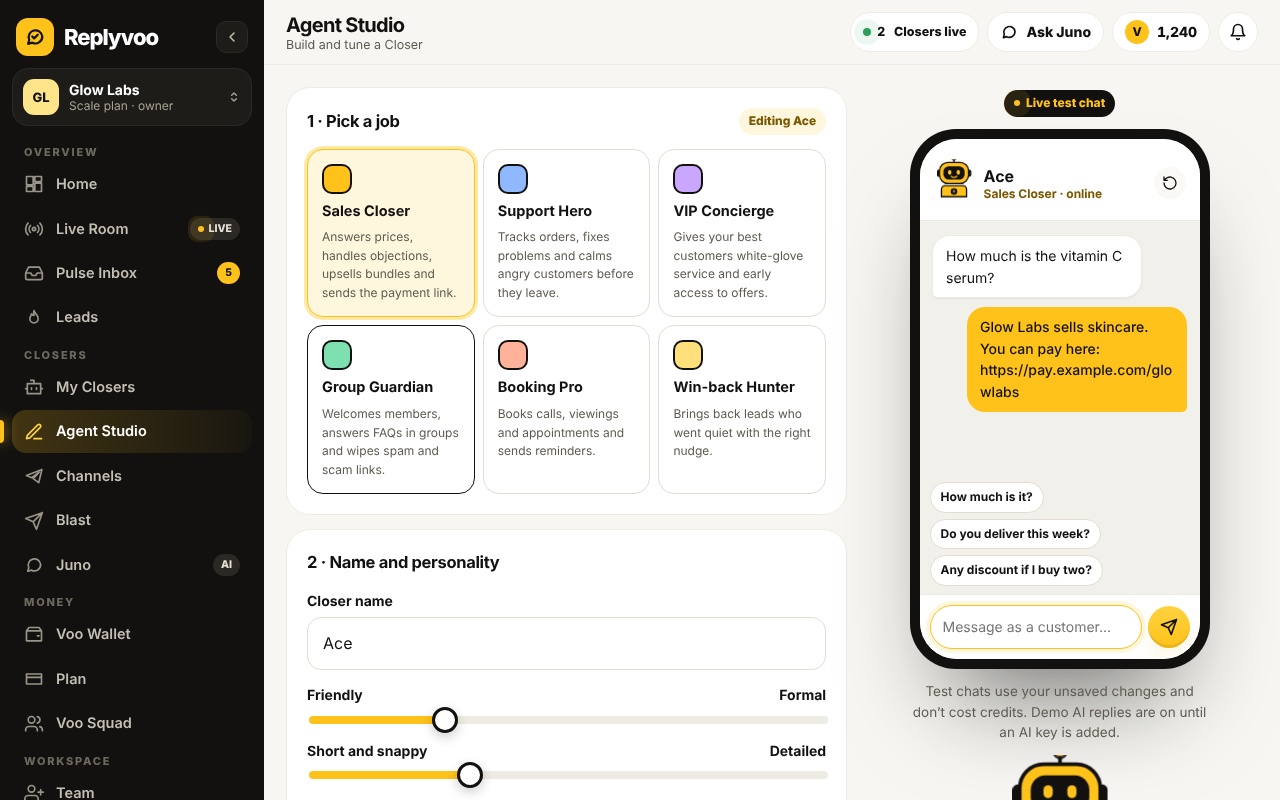
Need help with this stage? Read Build your first Closer in Agent Studio.
Step 2: Start the connection in Replyvoo
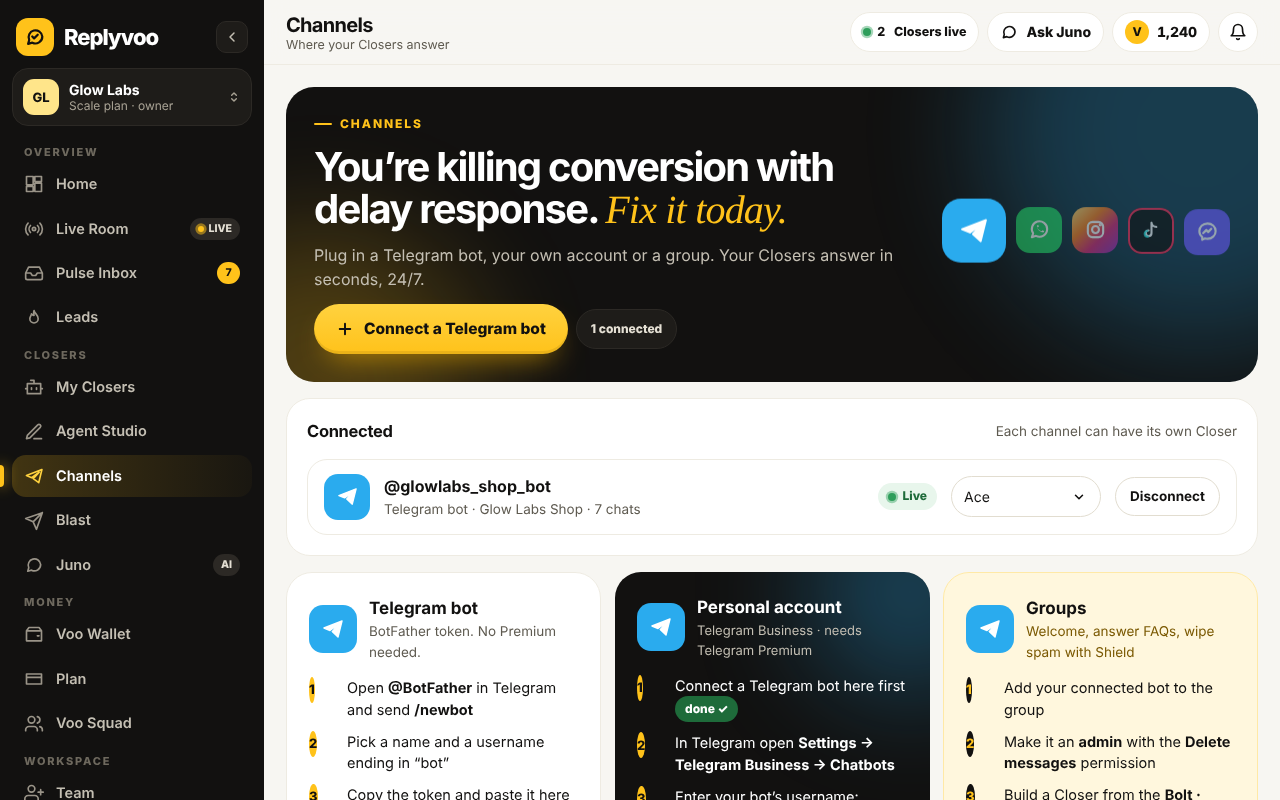
- In Replyvoo, go to Channels.
- Under Telegram, choose Personal account (Telegram Business).
- Follow the on-screen instructions. Replyvoo shows you the bot username to connect in Telegram.
- Assign the Closer you prepared.
Step 3: Connect the chatbot in Telegram
On your phone:
- Open Telegram and go to Settings.
- Tap Telegram Business.
- Tap Chatbots.
- Enter the bot username Replyvoo gave you and select it.
- Choose which chats the bot can access (more on this below).
- Make sure the bot is allowed to reply to messages.
- Save.
That's it. Send a message to your account from another Telegram account to test it.
Step 4: Choose the right chats
This is the most important decision on this page. Telegram lets you set access in a few ways, and the wording in the app may change slightly between versions, but the idea is the same:
- All private chats except selected. The Closer handles everyone, and you exclude the people it shouldn't touch.
- Only selected chats. The Closer handles only the chats or chat types you pick.
You can typically include or exclude groups of chats such as Contacts, Non-contacts, New chats and Existing chats.
A setup that works for most sellers:
- Include: Non-contacts and new chats. These are mostly customers and leads.
- Exclude: Contacts. Your family, friends and colleagues keep talking to the real you.
- Exclude individually: suppliers, partners and anyone you always want to answer personally.
If your contacts list is full of customers, flip it: include everyone, then exclude the specific personal chats you care about.
Step 5: Watch it work
Open Pulse Inbox in Replyvoo. Every chat the Closer handles appears there with the full thread.
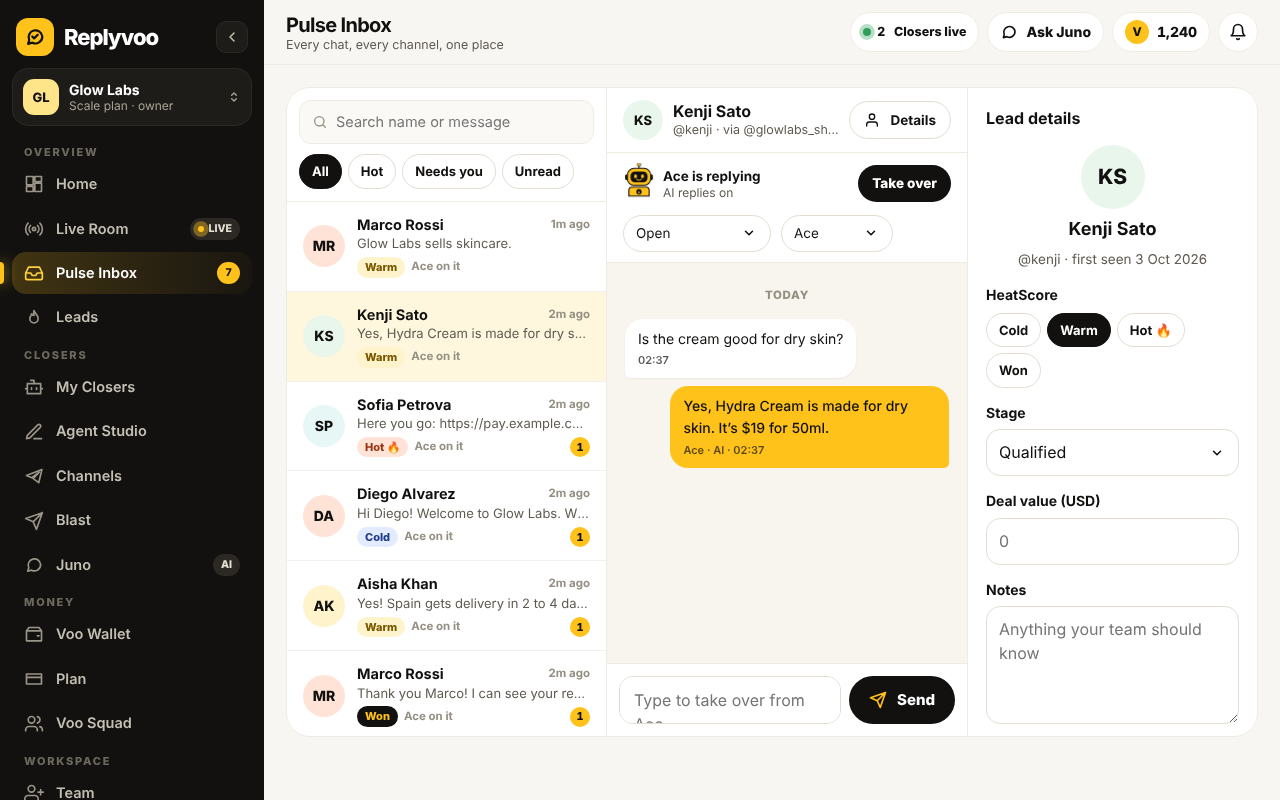
You can:
- Switch AI replies off on any chat and type yourself
- Switch it back on when you're done
- See HeatScore labels so you know which leads are Hot
You can also reply directly from your phone as normal. Just remember the Closer is active in that chat unless you turn AI replies off for it. The full playbook is in Pulse Inbox and human takeover.
Best practices for personal accounts
Sound like you. Customers know your style. Write a short "about me" in the knowledge base: how you greet people, how you sign off, words you use.
Be honest when it matters. If a customer asks "Am I talking to a bot?", your Closer should answer honestly. Put that in its instructions.
Keep sensitive topics human. Refunds over a certain amount, disputes, complaints about staff. Add them to Smart handoff rules so they come to you.
Don't let it promise things you can't deliver. Spell out delivery times and stock rules clearly. "We deliver within Lagos in 1 to 3 working days" is far better than "fast delivery".
Check the Night Shift Report every morning. It summarises what happened while you slept, including chats that need you.
Personal account or bot: which should you use?
Use personal Telegram Business when:
- Customers already have your personal handle
- You're a solo seller, consultant, coach or service provider
- Your brand is you
Use a bot when:
- You want a separate, shareable sales channel
- You run a team and don't want everything flowing through one person
- You want to run a Closer in groups
- You don't have Telegram Premium
Many businesses use both: a bot for ads and public links, and the personal account for repeat clients. Each can have its own Closer. Setting up a bot is covered in Connect a Telegram bot with BotFather.
Troubleshooting
No Telegram Business option in Settings. Check that Premium is active and your app is up to date.
The bot isn't replying. Confirm the chat type is included in your Chatbots access settings, that the bot can reply, and that AI replies is on for that chat in Pulse Inbox.
It replied to a friend. Add them to the excluded list, or exclude Contacts entirely.
Replies stopped mid-month. You may have used your plan's conversations. Check the Command Center and the Voo Wallet. See Replyvoo pricing explained.
You want to pause everything. In Telegram, go to Settings → Telegram Business → Chatbots and pause or remove the bot. You can reconnect anytime.
Next steps
- Start free on Replyvoo and connect your personal account
- Write a knowledge base your Closer can actually use
- Master Pulse Inbox and human takeover
Your first Closer is free and live in minutes.